AI gateway
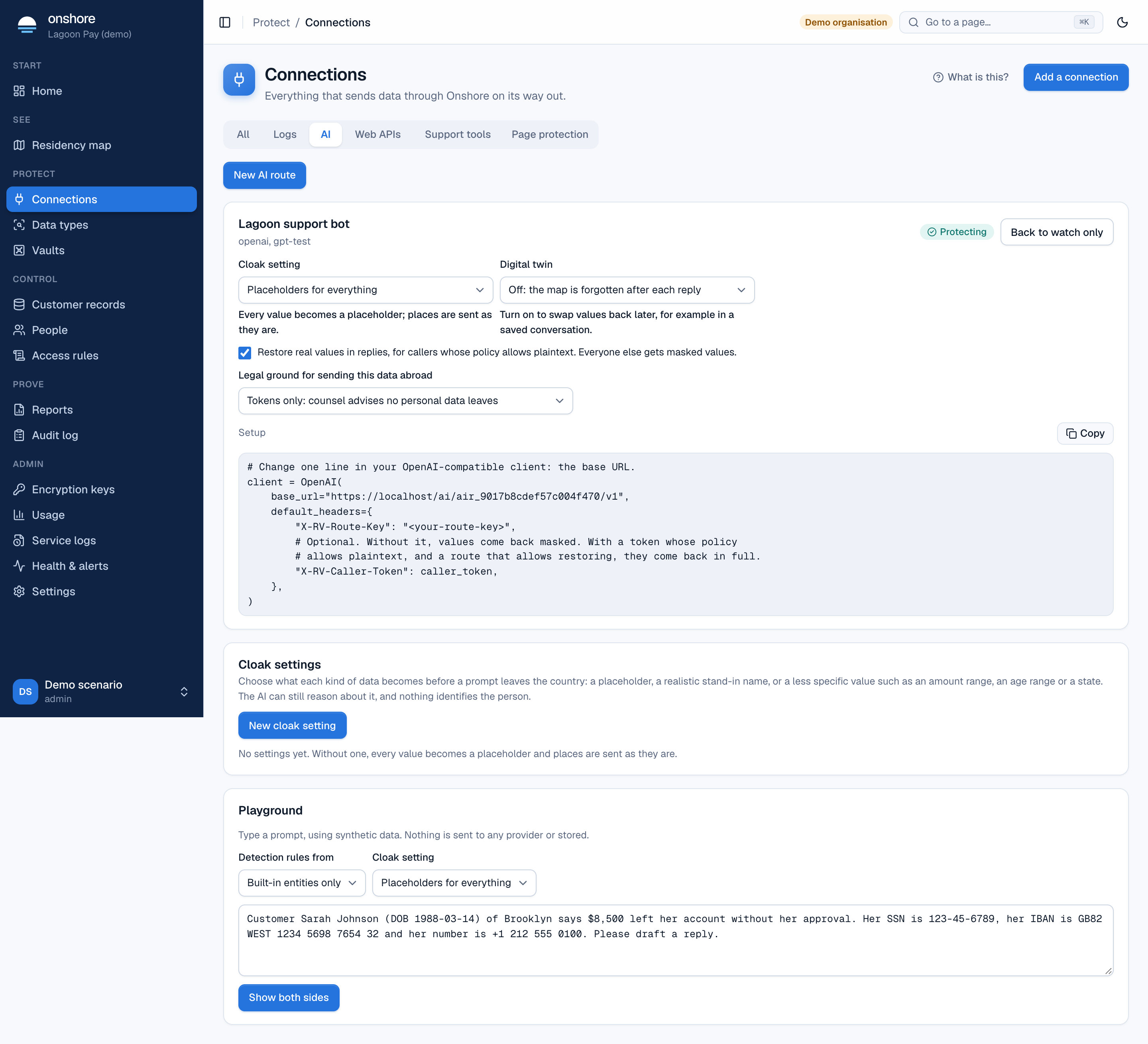
Support copilots and chatbots paste customer messages straight into a model hosted abroad, identifiers included. The AI gateway sits between your app and the model provider. It cloaks each prompt before it leaves the country, and restores real values in the reply for people allowed to see them. Your app changes one line: its base URL.
Create an AI route
Start the route
In Connections → AI, select New AI route.
Fill in the form
| Field | Meaning |
|---|---|
| Vault | Where the cloaking rules and any digital twins live |
| Name | Such as “Support chatbot” |
| Provider | OpenAI or another OpenAI-compatible provider |
| Provider base URL | The provider’s API address |
| Allowed models | Comma-separated. Requests for other models are refused |
Point your app at the route
You get a route address and a route key. Change your client’s base URL and send the key in the X-RV-Route-Key header. The Setup box shows the code; see also AI gateway integration.
client = OpenAI(
    base_url="https://vault.yourbank.example/ai/air_…/v1",   # was the provider's URL
    default_headers={"X-RV-Route-Key": ROUTE_KEY},
)
Watch, then protect
Prompts reach the provider unchanged while the route is watch only. Select Turn protection on when ready.
Cloak settings
A cloak setting chooses what each kind of data becomes before a prompt leaves the country. Without one, every value becomes a placeholder and places are sent as they are.
| Becomes | Example | Comes back in the reply? |
|---|---|---|
| Placeholder | Sarah Johnson → [NAME_1] | Yes |
| Stand-in name | Sarah Johnson → Emma Clarke | Yes, when the model writes it as given |
| Amount range | £1,250.50 → £1,000–£2,000 | No, by design |
| Age band | 34 → 30–39 | No |
| Year only | 1988-03-14 → 1988 | No |
| Card network or last 4 | → a Visa card, card ending 1111 | No |
| Email domain | → an address at example.com | No |
| State or region | A place → its state or region | No |
| Keep | Sent as it is | — |
Select New cloak setting, name it, and choose for each kind of data what it becomes before it leaves. The setting shows which routes use it. To delete a setting, move its routes to another setting first.
The AI can still reason about cloaked text: it knows [NAME_1] is a person and £1,000–£2,000 is an amount.
Restoring replies
Tick Restore real values in replies to swap placeholders and stand-in names back before the reply reaches your app. Real values come back only for callers whose access rule allows plaintext (send their token as X-RV-Caller-Token); everyone else gets masked values.
Digital twins
Normally the map from placeholders back to real values is forgotten after each reply. A digital twin keeps it, sealed in the vault and encrypted with the vault’s key, for the number of days you choose, so you can restore values later, for example in a saved conversation. Twins are deleted when they expire, and can be deleted early. The gateway returns the twin’s ID in X-RV-Cloak-Id.
Playground
Type a prompt with made-up data, choose which detection rules and cloak setting to use, and select Show both sides. You see what the provider receives and what the user gets back with no reveal permission. Nothing is sent to any provider or stored.
Detection uses your vault’s country packs and your own data types. Accuracy on languages other than English and on local spellings hasn’t been measured: try your own prompts in the playground first.
Limits
- Places are found from a fixed list of states, cities and well-known areas, and are case-sensitive. Street addresses aren’t found.
- A stand-in name is restored only when the model writes it as given, or its first or last name alone; not in capitals or misspelt.
- Ranges, age bands and states can’t be swapped back.